
Our AI ERP is a Build Your Own Resource Plan (BYRP): a custom ERP for Canadian businesses. AI writes, tests and maintains the software, so the screens and workflows you ask for arrive in days. Inside it, AI prepares the everyday work and your team approves it, on one ledger for accounting, sales, supply chain, payroll and field service.
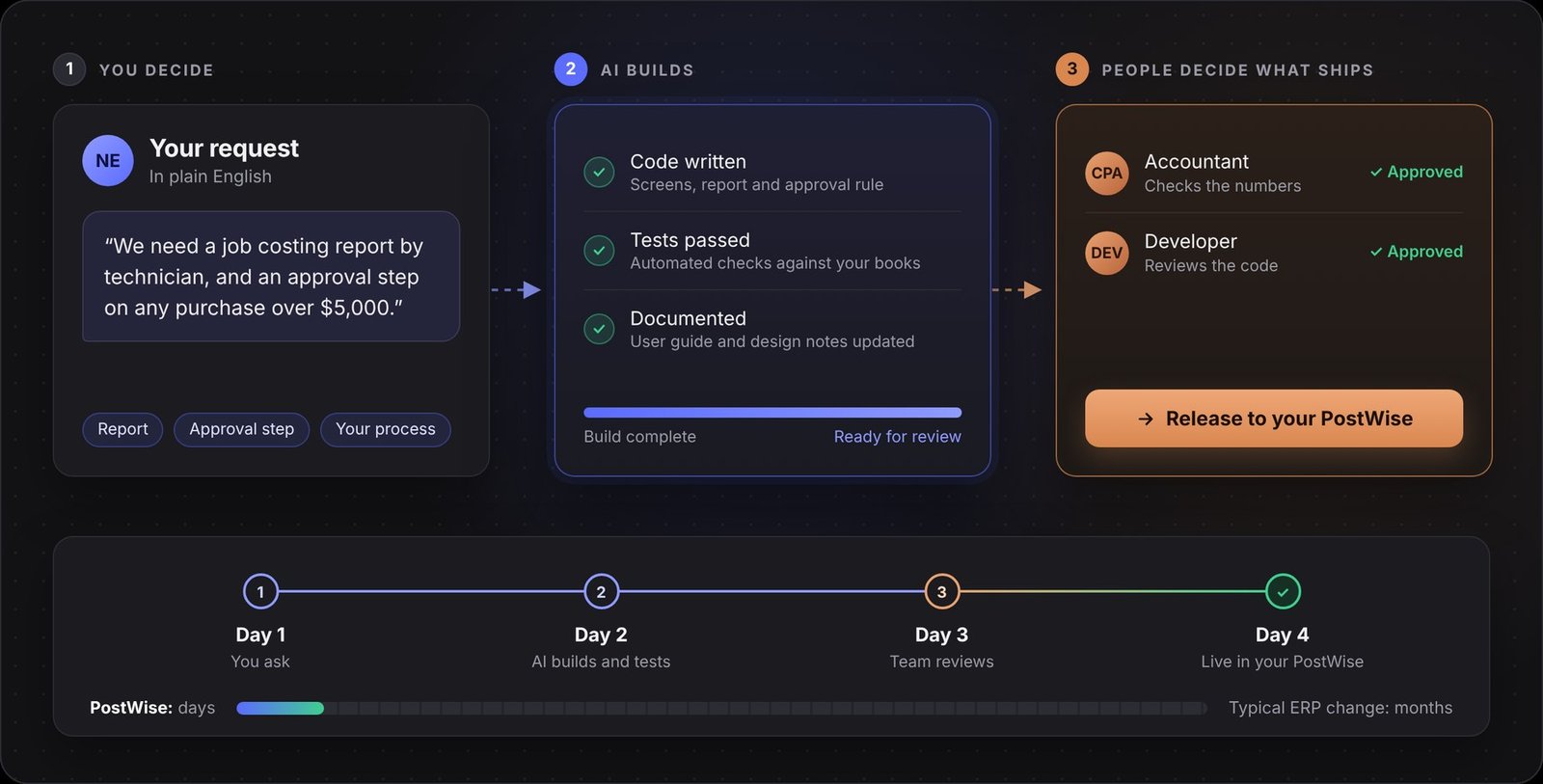
Most ERPs make you change how you work to fit the software, then charge for every change. Ours works the other way. We call it Build Your Own Resource Plan, or BYRP: you tell us what the system should do, and our AI development process writes the code, tests it and documents it. The screen, report, approval step or integration you asked for is in your ERP in days, not months.
Every change is reviewed and released by our team of accountants and developers. AI does the building. People decide what ships.
Need a screen, report, approval step or integration that isn’t there yet? Tell us in plain English. It’s built to your process and goes live without an upgrade project.
Every change runs through hundreds of automated tests, then an accountant and a developer review it before it reaches your books.
AI reviews the code every week, keeps the user guide and design documents current, and flags issues early. Our team approves every fix and every release.
The AI prepares. You post. Our AI ERP is built with a Human in the Loop: every AI feature stops before the final step, so posting, approving and sending always stay with a person.
Attach a bank statement, a stack of supplier bills or a note about a service call, and say what you need in plain English. The AI reads the paperwork, fills in the real entry screen and codes each line against your chart of accounts, with the reason for every suggestion, so your team checks the work instead of keying it.
You stay in control of the AI itself. It’s off until you switch it on, works only for the clients and workflows you choose, runs on the provider and key you pick, and a What’s Sent page shows exactly what left the system.
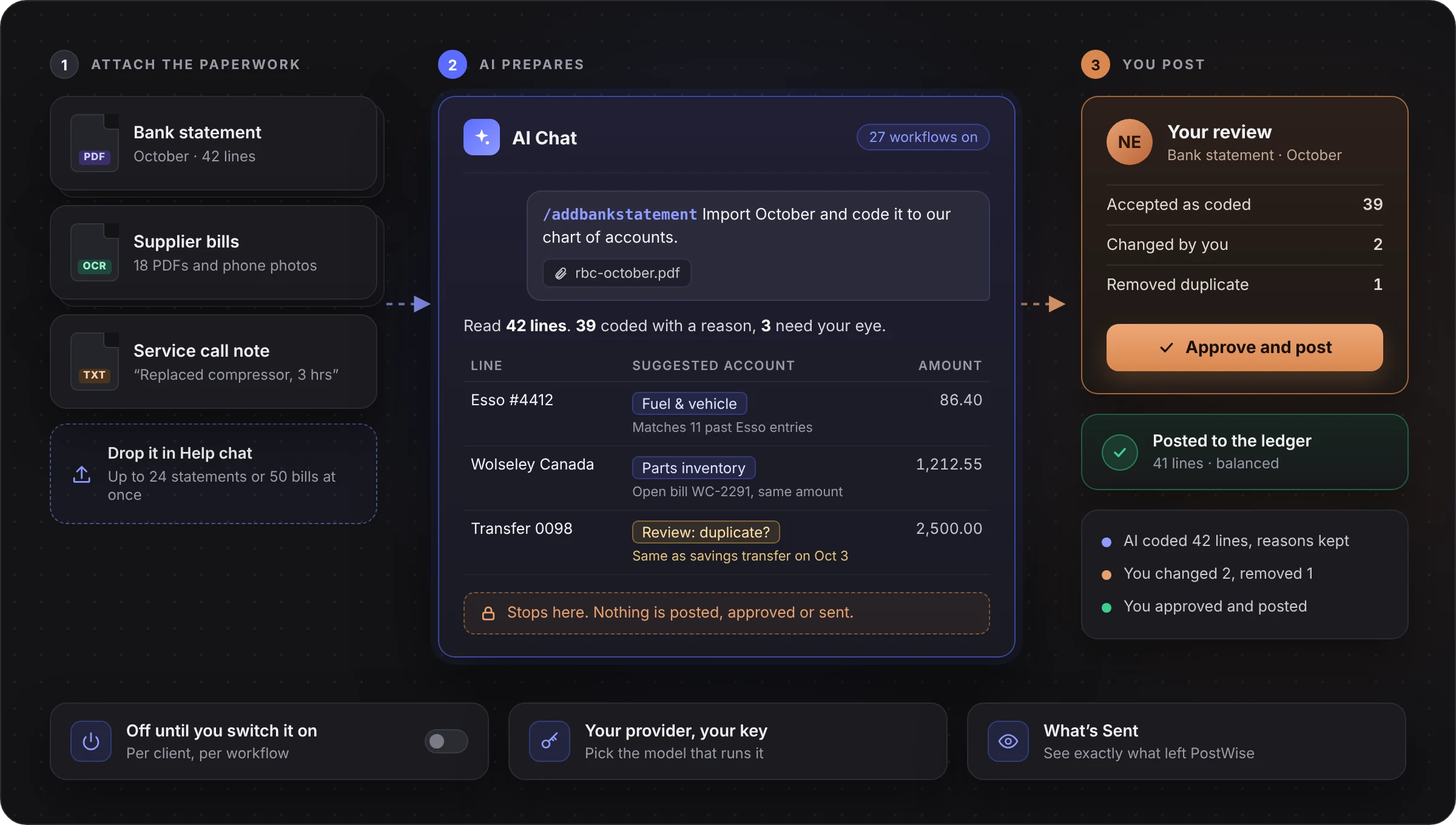
Drop in up to 24 statements at once as CSV, Excel or PDF, scanned pages included. The AI codes each line and catches duplicates, entries already in the ledger and transfers between your own accounts. Statement readers are checked against real statements to the cent.
Read up to 50 bills at a time from PDFs or phone photos with built-in OCR. Totals are checked and each bill is drafted for review.
Type a request in Help chat and attach the paperwork. 27 AI Chat workflows across every module fill in the real entry screen, then stop for you to review.
Ask about your books, stock and payroll in plain English. These workflows only read; they never change anything.
AI is off until you switch it on. Choose from 9 providers, including Anthropic, OpenAI and Google Gemini, use your own key, and decide which clients and workflows it can touch.
Each correction can become a rule, so next month there is less to review. A What’s Sent page shows exactly what goes to the AI provider.
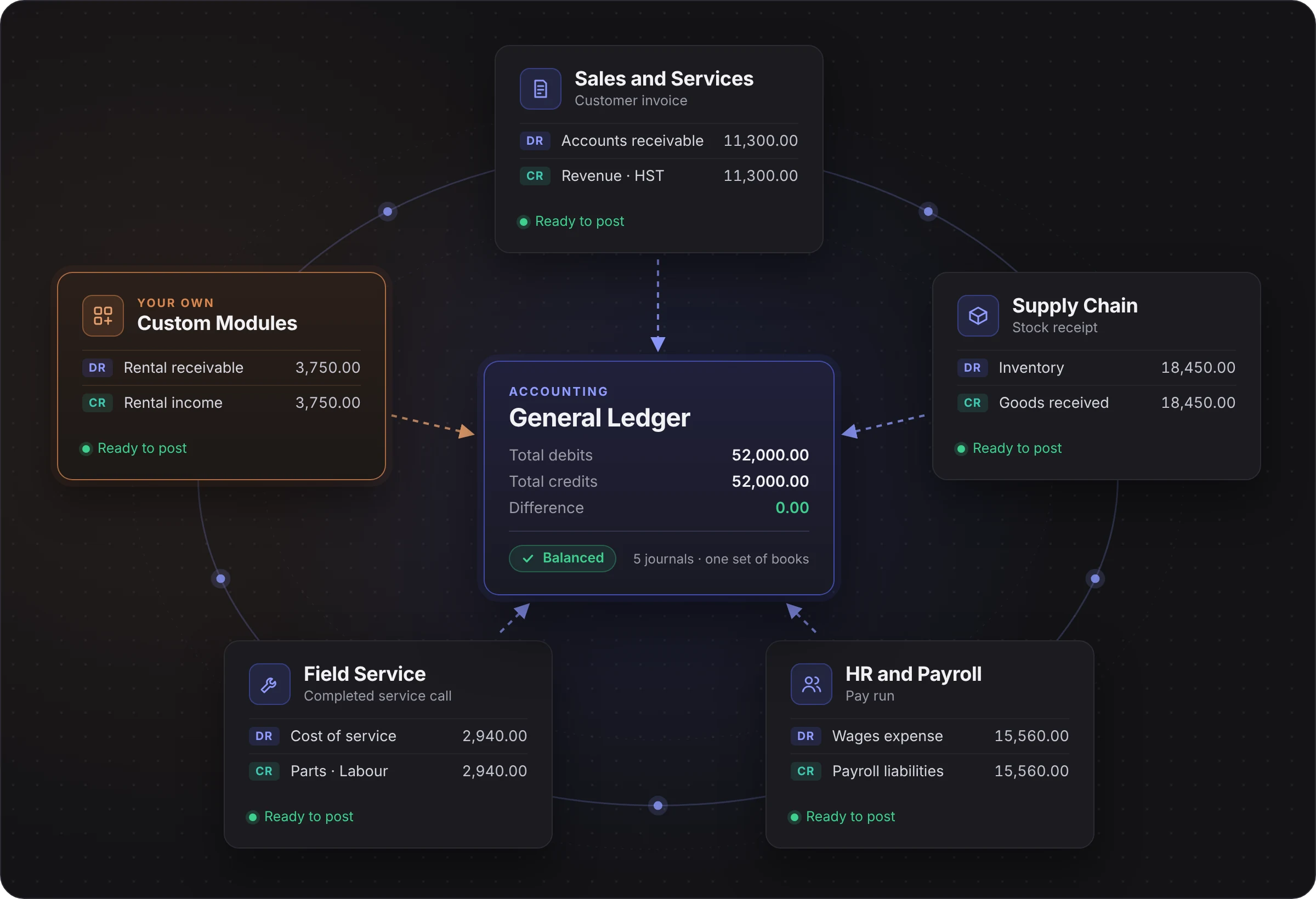
Every module posts to the same books. Sales, purchasing, payroll and field service don’t keep their own records and sync later. Each one writes a balanced double-entry journal straight into one general ledger, so the numbers in every report already agree.
Posting Control shows exactly how that happens. The posting map draws each module around the general ledger, and for every posting, from an invoice or a stock receipt to a pay run or a completed service call, it shows which account is debited, which is credited and whether it’s ready to post.
Start with Accounting and switch on the rest as you grow. Turn a module on and its postings appear on the map, with the accounts already suggested for you to confirm.
The double-entry ledger at the centre: bank statements, supplier bills, reconciliation, fixed assets, budgets, cost centres, multi-currency and the year-end close.
AI reads and codes statements and bills, catching duplicates and transfers between your own accounts. Reconciliation ticks off what cleared, and every other module posts here through Posting Control, with a full audit trail behind each entry.
Estimates, sales orders, invoices, credit notes, projects and time, with a CRM that keeps leads and opportunities next to the invoices.
Turn an estimate into an order and an invoice without retyping, with HST worked out on every line. Customers approve estimates and pay through links and a portal, and payments, credit notes and bad-debt write-offs post to the right accounts on their own.
Requisitions, RFQs, purchase orders, locations and bins, serials and lots, landed costs and shipping, with stock valued in the ledger as it moves.
Compare supplier quotes, receive goods into the right bin and spread freight and duty across what arrived. Every receipt, transfer and sale updates the inventory value in the books, so stock on the shelf and the balance sheet always agree.
Employees, leave, timesheets, recruitment and reviews, with Canadian pay runs, remittances, T4 and RL-1 posted straight to the books.
Approved leave flows through to the dispatch board, so no one is booked while they’re away. Pay runs work out CPP, EI and income tax, and each run posts its wages, deductions and remittance owing to the ledger the moment it’s approved.
Service requests with SLAs, a dispatch board, a My Day phone screen for technicians, contracts, preventive maintenance and a customer portal.
The dispatch board suggests who to send, matched on skill, time off, region and nearby work, with the reason shown, and plans each technician’s day in the shortest route with timed visits. Parts used come off the van’s stock and go straight on the invoice. Comparing options? Read our field service software guide for Canadian trades.
Need something no off-the-shelf ERP covers? Tell us how your business works and we’ll build it as a module of its own: its screens, approvals, reports and AI Chat workflows, made for your process.
Built by AI, tested and reviewed by our team, and switched on like any other module, usually in days. It posts through Posting Control to the same ledger, so your own module and your books always agree.
Sales tax, payroll and year-end are built in for all 13 provinces and territories, with dated rate tables so a mid-year change applies from the right day. The system prepares the figures, slips and files; you review them and file with the CRA or Revenu Québec. Run it in the cloud or on premises on your own servers, and your data stays in Canada either way. Built by accountants at Cloud Peach AI in Mississauga, Ontario.
GST/HST, QST and PST returns, CPP, QPP, EI and QPIP, remittances, T4, RL-1 and ROE data, T2 GIFI and CCA.
Microsoft and Google sign-in, Google Drive and OneDrive, Stripe, EasyPost, Twilio and Bank of Canada rates. Need another system? We connect it.
Each company’s data kept apart at the database level, two-factor sign-in, roles by module and client, encrypted files stored in Canada and an audit log that can’t be edited.
Choose a cloud ERP, hosted and kept up to date for you, or an on-premise ERP running on your own servers when your data has to stay in-house. It is the same system either way: the same modules, the same ledger and the same custom features, and you can move from one to the other later.
An ERP (enterprise resource planning system) runs finance and operations in one system. Ours is an AI ERP in two ways: AI builds and maintains the software itself, and AI prepares the everyday work inside it, such as coding bank statements and drafting bills, for your team to review and post. New to ERPs? Read what an ERP system is.
Our development process uses AI to write, test and document the software, and to review the code and refresh the documentation on a regular schedule. That’s why custom features take days rather than months. Our team of accountants and developers reviews and approves every release.
No. Our AI ERP keeps a Human in the Loop: every AI-prepared entry waits for a person to review it and choose Post, Approve or Send. AI is off until you switch it on, per company, per client and per workflow.
Yes. Tell us the screen, report, approval step, AI Chat workflow or integration you need. We build it, test it and deploy it to your ERP, usually in days.
Yes. We help you bring your records across, and customers, suppliers and bank rules can come in from CSV. Most businesses start with Accounting and switch on other modules when they’re ready.
In the cloud, with files and backups kept in Canada, or on your own servers. Each company’s data is walled off at the database level and attachments are encrypted. To weigh the options, read cloud ERP vs on-premise ERP.
No. Modules are switched on per company. Start with what you need today and add the rest as you grow, on the same ledger with nothing to migrate.
Yes, with people in charge. Our AI development process writes, tests and documents the screens, reports and workflows you ask for, and our accountants and developers review every change before it is released. That is how custom features arrive in days instead of months.
No. An ERP stays the system of record for your books, stock and payroll, where every number has to balance and be auditable. AI changes how the work gets done: it reads statements and bills, prepares entries and answers questions about your books, while a person approves what is posted. More on what AI can and can’t do inside an ERP.
Traditional ERPs usually charge for the whole suite, plus months of consulting to set up and paid projects for every change. With our AI ERP you switch on only the modules you need, custom features are built in days rather than as long projects, and you can start with a free trial. Book a demo and we will quote for your business. For a full breakdown, read what an ERP costs for a small business in Canada.
If you only need bookkeeping, invoicing and tax filing, accounting software may be enough. Once sales orders, stock, payroll or field service live in separate tools and get re-keyed into your books, an ERP saves time because every module posts to the same ledger. Ours starts as accounting and grows into an ERP as you switch modules on. For the warning signs in more detail, read ERP vs accounting software.
Book a free demo and we’ll walk you through the system using the kind of work your business does every day, and show you how a custom feature gets built.